


Kubernetes Explained from Scratch

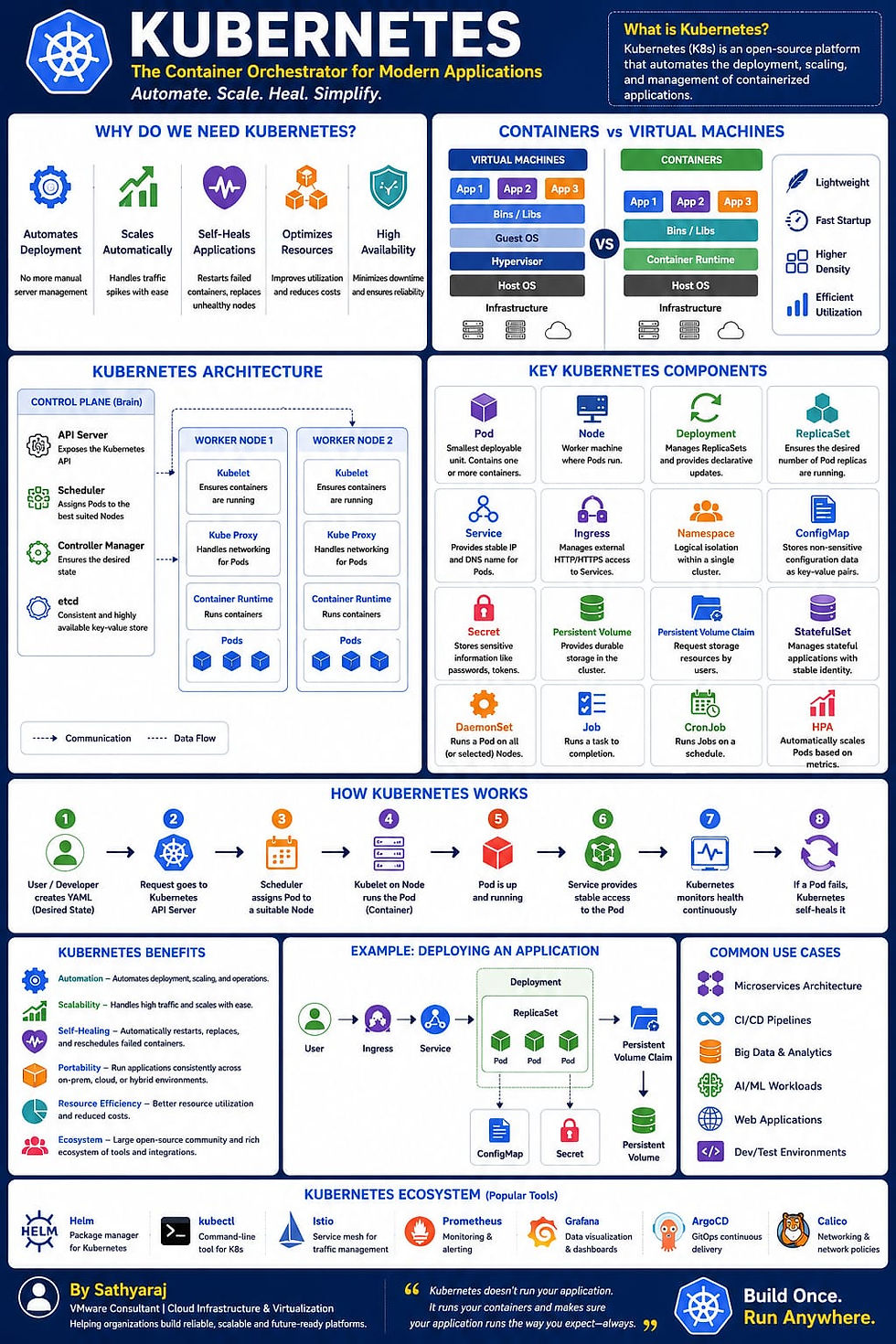
What is Kubernetes?
Imagine you own a food delivery company with 500 restaurants across multiple cities.
Each restaurant has:
Chefs (Applications)
Kitchen (Servers)
Delivery staff (Networking)
Store manager (Monitoring)
Inventory (Storage)
Now imagine thousands of customer orders arriving every minute.
Questions arise:
Which restaurant should prepare the order?
What if one restaurant closes?
What if demand suddenly doubles?
How do you ensure customers always get their food?
Managing all this manually would be nearly impossible.
This is exactly the problem Kubernetes solves for software applications.
Kubernetes automatically deploys, scales, monitors, and heals applications running inside containers.
Why Do We Need Kubernetes?
Before Kubernetes, developers faced several challenges:
Applications crashed frequently.
Manual deployments caused downtime.
Scaling applications required human intervention.
Infrastructure utilisation was poor.
Recovering from failures took too long.
Kubernetes automates these operational tasks, allowing teams to focus on building applications rather than managing servers.
What is a Container?
A container is a lightweight package that includes:
Application code
Runtime
Libraries
Dependencies
Configuration
Think of it like a shipping container.
Regardless of what's inside, every shipping container has the same standard size, making transportation simple.
Similarly, containers ensure applications run consistently across laptops, test environments, and production.
Popular container platform:
Docker
Virtual Machines vs Containers
Virtual Machines
Containers
Includes full operating system
Shares host operating system
Larger in size
Lightweight
Slower startup
Starts in seconds
Higher resource usage
Efficient resource usage
Suitable for isolated workloads
Ideal for cloud-native applications
Kubernetes Architecture
A Kubernetes cluster consists of:
Control Plane
The brain of Kubernetes.
Responsibilities:
Scheduling applications
Monitoring cluster health
Managing desired state
Handling API requests
Main components:
API Server
Scheduler
Controller Manager
etcd (Cluster database)
Worker Nodes
Worker nodes run the actual applications.
Components:
Kubelet
Container Runtime
Kube Proxy
Understanding Kubernetes Components
Pod
A Pod is the smallest deployable unit in Kubernetes.
It contains:
One or more containers
Shared network
Shared storage
Think of a pod as an apartment where one or more people (containers) live together.
Node
A Node is a physical or virtual machine where Pods run.
One node can host many Pods depending on CPU and memory.
Cluster
A Cluster is a collection of worker nodes managed by the control plane.
Example:
1 Control Plane
5 Worker Nodes
Hundreds of Pods
Deployment
A Deployment ensures your application is always running.
If a Pod crashes, Kubernetes automatically creates a new one.
Example: Desired state:
3 Pods
Current state:
2 Pods
Kubernetes immediately creates the third Pod.
ReplicaSet
ReplicaSet maintains the desired number of identical Pods.
Example: Desired replicas: 5
If one Pod fails:
ReplicaSet creates another automatically.
Service
Pods have temporary IP addresses.
Whenever Pods restart, IPs change.
A Kubernetes Service provides a stable IP address and DNS name for accessing Pods.
Types:
ClusterIP
NodePort
LoadBalancer
ExternalName
Ingress
Ingress manages external HTTP/HTTPS traffic.
Instead of exposing multiple services individually, Ingress routes traffic based on rules.
Example:
Namespace
Namespaces logically separate workloads.
Example:
Production
Development
Testing
Finance
HR
This allows multiple teams to share the same cluster securely.
ConfigMap
Stores application configuration separately from the application.
Example:
Database Server
API URL
Application Mode
Applications can change configuration without rebuilding container images.
Secret
Stores sensitive information securely.
Examples:
Passwords
API keys
Certificates
Tokens
Persistent Volume (PV)
Containers are temporary.
If a Pod is deleted, its local data disappears.
Persistent Volumes provide durable storage for applications.
Persistent Volume Claim (PVC)
Applications request storage using PVCs.
Kubernetes automatically connects the requested storage.
StatefulSet
Used for applications requiring stable identity and persistent storage.
Examples:
MySQL
PostgreSQL
MongoDB
Cassandra
DaemonSet
Runs one Pod on every node.
Common use cases:
Monitoring agents
Logging agents
Security tools
Job
Runs a task once.
Example:
Database migration
Backup
Data import
CronJob
Runs scheduled tasks.
Example:
Nightly backup
Weekly cleanup
Monthly report generation
How Kubernetes Works
A developer creates a Deployment.
The request is sent to the API Server.
The Scheduler selects a suitable worker node.
The Kubelet starts the container.
The Pod becomes available.
Services expose the application.
Kubernetes continuously monitors the application.
If a Pod fails, Kubernetes automatically recreates it.
Kubernetes Self-Healing
One of Kubernetes' biggest strengths is self-healing.
If:
A Pod crashes
A node fails
An application stops responding
Kubernetes automatically:
Restarts containers
Creates replacement Pods
Reschedules workloads to healthy nodes
Maintains the desired number of replicas
This minimises downtime without manual intervention.
Kubernetes Auto Scaling
Kubernetes can automatically scale applications based on demand.
Types of scaling:
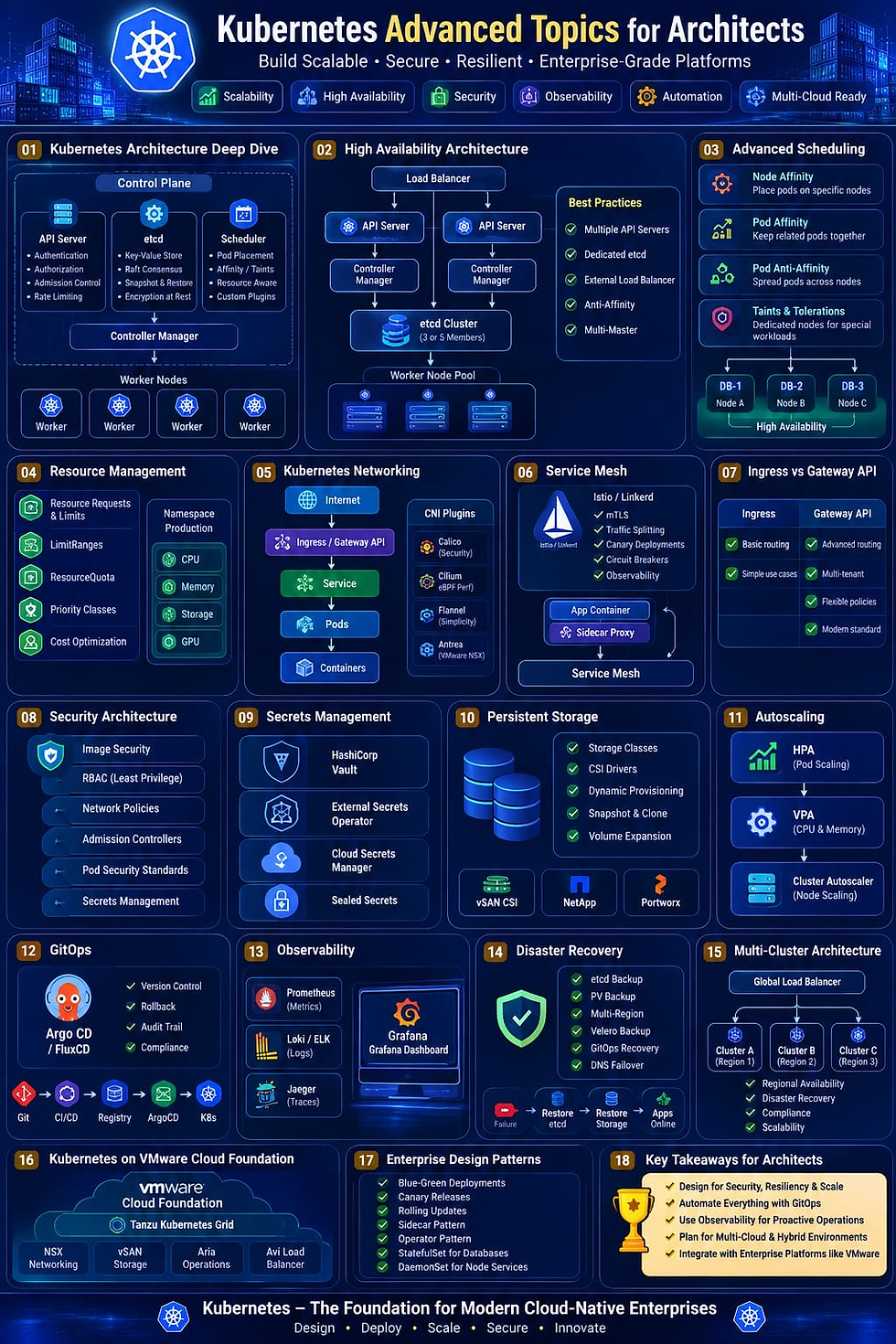
Horizontal Pod Autoscaler (HPA): Adds or removes Pods based on CPU, memory, or custom metrics.
Vertical Pod Autoscaler (VPA): Adjusts CPU and memory allocated to Pods.
Cluster Autoscaler: Adds or removes worker nodes based on cluster capacity.
Kubernetes Networking
Every Pod receives its own IP address.
Communication can occur:
Pod to Pod
Pod to Service
Service to External Users
Networking is managed by Container Network Interface (CNI) plugins such as Calico, Cilium, or Antrea.
Kubernetes Storage
Applications like databases need persistent data.
Kubernetes supports many storage backends:
Local disks
NFS
iSCSI
VMware vSAN
Amazon EBS
Azure Managed Disks
Google Persistent Disk
Storage is abstracted through Container Storage Interface (CSI) drivers.
Kubernetes Security
Security is built into Kubernetes through:
RBAC (Role-Based Access Control) for permissions.
Namespaces for workload isolation.
Network Policies to control traffic.
Secrets for sensitive data.
Pod Security standards to enforce secure configurations.
Kubernetes in VMware Cloud Foundation
In VMware Cloud Foundation, Kubernetes integrates through VMware vSphere Kubernetes Service (VKS) and the Supervisor Cluster. This allows administrators to provision and manage Kubernetes clusters directly from vSphere while benefiting from enterprise features such as vSAN storage, NSX networking, and unified lifecycle management.
Benefits of Kubernetes
Automates application deployment.
Self-heals failed workloads.
Scales applications automatically.
Optimises infrastructure usage.
Supports hybrid and multi-cloud environments.
Enables rolling updates with minimal downtime.
Provides consistent deployments across environments.
Large open-source ecosystem and community support.
Real-World Example
Consider an online shopping website during a festive sale:
Normal day: 10 Pods handle customer traffic.
Sale begins: Traffic spikes to 1 million users.
Kubernetes automatically scales to 100 Pods.
After the sale, it scales back to 10 Pods.
If a server fails, workloads move to healthy nodes automatically.
Customers continue shopping without noticing the infrastructure changes.
Final Thoughts
Kubernetes has become the de facto platform for running modern, cloud-native applications. It simplifies deployment, automates scaling, improves reliability, and provides a consistent operating model across on-premises data centres and public clouds. Whether you're a system administrator, VMware engineer, developer, or cloud architect, understanding Kubernetes is now a fundamental skill for managing modern IT environments.


Comments